
Warehouse Security Camera Placement Guide for Atlanta
Warehouse cameras work best when they support how the facility actually operates. A camera aimed at an entrance may help document arrivals, while loading docks, aisles, inventory zones, offices, and hard-to-reach areas each create different coverage needs. Atlanta facilities also have to account for changing daylight, glare, nighttime conditions, recording goals, and privacy policies.
Schedule a warehouse camera coverage review. Call (770) 645-0061 or contact American Alarm online.
A practical warehouse security camera placement guide starts with a site-specific coverage map, then matches camera views, lighting, recording, and monitoring to the building’s layout, activity, and risk. Professional business surveillance camera systems can also integrate with access control and other low-voltage systems.
The right design is not simply a matter of adding cameras. It begins by identifying the views that matter most, the blind spots that could undermine coverage, and the operational decisions the system should support. From there, positioning principles help determine how each warehouse zone should be evaluated.
How Should Security Cameras Be Positioned in a Warehouse?
Answer: Position warehouse cameras from a site map, not from a standard template. Mark entrances, exits, loading docks, aisles, inventory areas, offices, exterior approaches, and places where shelving or equipment can create blind spots. Then select each camera’s field of view and angle around the activity that needs to be seen. This warehouse security camera placement guide starts with coverage goals, building layout, occupancy, daily operations, and risk.
A well-planned layout can give managers useful views of movement, deliveries, inventory activity, and access points without simply adding devices wherever power is available. American Alarm’s business surveillance camera systems are designed around the facility and its operating needs.
Start with a coverage map
Begin with a current floor plan and walk the building during normal operations. Note which doors are used most often, where trucks approach and depart, how forklifts move, and which storage areas contain higher-value or frequently handled inventory. Include offices, receiving areas, dispatch points, and routes between public and restricted parts of the building. A map makes gaps easier to identify before installation and helps distinguish a camera that documents a broad area from one intended to show activity at a specific point.
- Map movement: Mark people, vehicles, inventory, visitors, and restricted routes on the current floor plan.
- Prioritize risk: Identify access points, chokepoints, high-value zones, and areas that are hard to observe.
- Test the view: Check angles, lighting, obstructions, and normal activity before finalizing each location.
- Access points: Cover entrances, exits, employee access doors, and loading dock approaches so movement can be reviewed in context.
- Chokepoints: Prioritize narrow routes, gates, corridors, and locations where people or equipment must pass.
- Inventory zones: Consider storage areas, high-value goods, picking locations, and transitions between receiving and storage.
- Blind-spot risks: Account for tall racks, stacked materials, roof supports, parked trailers, and changes in the warehouse layout.
Set the field of view and angle for the task
Camera placement is more than choosing a wall or pole. The field of view should match the distance and area that matter. A wide view can help observe activity across an open section, while a narrower view may be more useful at a doorway, dock, or other defined point. Angles should reduce obstructions and avoid a steep downward perspective that shows only the tops of heads. At entrances and transaction points, the goal is a clear, useful view of the activity rather than a distant image of the entire room.
| Warehouse zone | Coverage goal | Placement check |
|---|---|---|
| Entrances and exits. | Review arrivals, departures, and access activity. | Check approach direction, daylight, and door obstructions. |
| Loading docks. | Connect trailer, staging, and interior movement. | Test open and closed doors, vehicles, and equipment. |
| Aisles and inventory. | Observe movement and high-value storage access. | Check racks, intersections, blind spots, and changing layouts. |
| Offices and exterior areas. | Support defined business and perimeter objectives. | Review privacy, lighting, weather, and operational purpose. |
Mounting height is site-specific. A camera must be high enough to reduce accidental contact and work with the building’s structure. It should not be so high or poorly angled that faces, packages, or vehicle activity become difficult to see. Racking height, lighting, ceiling construction, access equipment, and maintenance requirements all affect the decision. Review the view from the camera’s intended position, then adjust the angle and coverage for real operating conditions.
Finally, test the proposed layout at different times of day and after typical doors, vehicles, and equipment are in place. This practical check can reveal glare, shadows, blocked views, or a newly created blind spot before the system is finalized.
A Warehouse Security Camera Placement Guide for Key Zones
A useful camera map follows how people, vehicles, inventory, and visitors move through the building. The goal is not to add devices indiscriminately. It is to create visual coverage of decision points, valuable areas, and locations where the building layout can hide activity. A site-specific plan should account for the warehouse footprint, occupancy, daily operations, risk, and hard-to-reach areas.
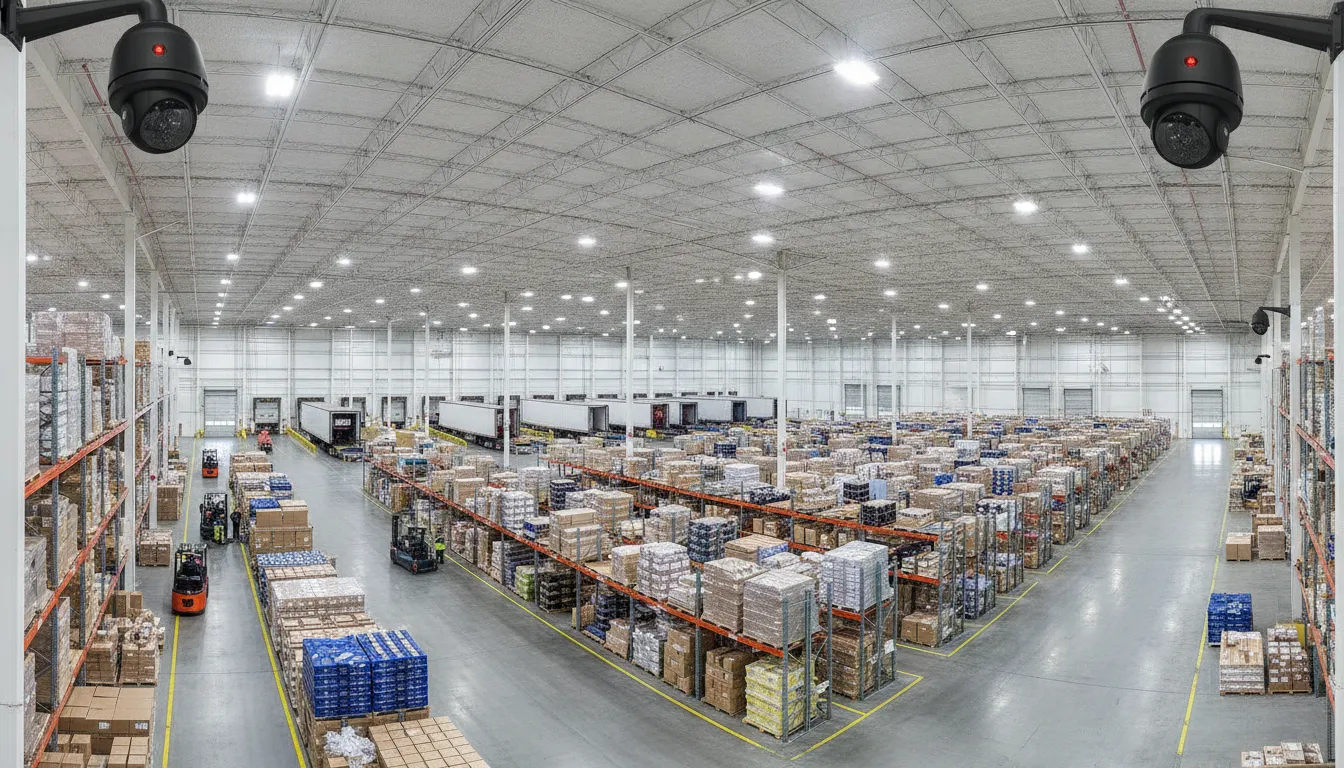
- Entrances and exits: Cover employee entrances, visitor doors, emergency exits, and vehicle access points where practical. The view should help identify the person or vehicle approaching the opening, not merely show a door from too far away. Consider the direction of travel, changing daylight, and whether an open door or nearby structure can block the scene.
- Loading docks: Place coverage around dock doors, trailer approaches, staging areas, and the paths between the dock and interior storage. Loading activity changes throughout the day, so map views for both open and closed dock doors. Check whether trailers, lift equipment, pallets, or temporary staging can obscure the camera view.
- Aisles and intersections: Use the warehouse aisle plan to identify long sightlines, cross-aisle intersections, forklift routes, and areas where traffic changes direction. A camera that sees only one straight aisle may miss activity at the turn. Position views to support useful identification while avoiding steep angles that show only the tops of heads.
- Inventory and high-value zones: Give extra attention to receiving, packing, shipping, cages, controlled storage, and locations holding high-value or sensitive inventory. Connect the camera map to the actual workflow. A view should show access to the zone and the surrounding approach, while racks and stacked goods should not create an unexamined pocket behind the primary scene.
- Offices and administrative areas: Consider cameras at office entrances, transaction points, dispatch areas, and storage locations for records or equipment when the business purpose supports coverage. Avoid treating every interior room as a camera location. Privacy expectations and company policy should guide whether a space belongs on the map.
- Exterior and perimeter views: Review fence lines, vehicle gates, rear service areas, side walls, parking approaches, and less visible corners. Exterior views can help connect an event at a door or dock with activity outside the building. Account for lighting, weather exposure, landscaping, signs, and seasonal changes that may narrow the field of view.
- Blind spots and changing layouts: Walk the planned routes and mark obstructions before finalizing placement. Racks, columns, overhead doors, fire equipment, stacked pallets, conveyors, and temporary barriers can interrupt coverage. Recheck the map when racks move, new equipment is installed, or the warehouse changes use. A camera plan should be maintainable, not just accurate on installation day.
Review the map from the floor: Compare the proposed views with normal receiving, picking, and shipping activity. This practical walkthrough often reveals a blocked doorway, a glare source, or a blind corner that is easy to miss on a paper floor plan.
For a broader view of how placement fits into business surveillance camera systems, connect each proposed view to a clear operational purpose. The resulting map gives an installer and facility manager a shared reference for field of view, blind-spot review, testing, and future changes.
How Lighting and Camera Specifications Affect Coverage
A camera can be correctly aimed and still produce weak evidence if the lighting changes throughout the workday. Warehouse coverage should be evaluated in the conditions the system will actually face, including bright daylight. Uneven aisle lighting, shadows beneath shelving, reflective surfaces, and dark exterior areas after closing. A site-specific design should match the camera and lighting choices to the coverage objective, rather than treating a higher specification as automatically better.
Plan for glare, shadows, and backlighting
Dock doors are a common example. When an exterior door is open, daylight can create strong backlighting behind a person or vehicle entering the building. The image may show a silhouette instead of useful identifying detail. Glare from polished floors, shrink wrap, metal shelving, or vehicle surfaces can create a similar problem. Walk the proposed camera locations at different times of day and note where the sun, overhead fixtures, and vehicle headlights enter the scene.
Lighting may also vary between a bright loading area and a dim storage aisle. Shadows can conceal faces, labels, or activity at the edges of the image. A camera’s low-light performance, exposure handling, and compatibility with available illumination should be considered together. Nighttime exterior views require a separate check. A camera that performs well indoors during business hours may not provide the same detail across a dark yard, fence line, or approach to a dock.
Match field of view and resolution to the objective
Field of view determines how much of the warehouse a camera can see, but a wider view can spread available detail across a larger area. Resolution should therefore be selected according to what the recording needs to show. A broad overview may help confirm movement and activity across an aisle. A narrower view may be more appropriate where the objective is to observe a doorway, dock interaction, or a defined inventory location. The right choice depends on distance, lighting, viewing angle, expected motion, and the detail the business needs to review later.
Fast-moving forklifts, vehicles, and people can expose weaknesses in shutter, exposure, and motion handling. Test representative movement instead of judging a still image from an empty warehouse. Check whether faces, package markings, and vehicle details remain usable as subjects move through the scene. Avoid steep angles that show only the tops of heads, and consider diagonal positioning or natural chokepoints when the layout supports it.
Test from the intended viewer’s perspective
Final testing should take place from the monitor, recorder, or authorized remote view where the footage will actually be reviewed. Check daytime and nighttime scenes, changing dock-door conditions, aisle shadows, glare, and motion. Confirm that the field of view covers the intended area without creating avoidable blind spots, then document any lighting changes or future warehouse alterations that could affect performance. For more planning context, review this guide to commercial CCTV coverage planning.
Recording, Retention, and Monitoring for Atlanta Warehouses
A camera system is most useful when recorded video can answer practical questions after an incident, support daily operations, and remain available to authorized people. Before selecting storage, define what the warehouse needs the system to document. That may include activity at entrances, loading activity, movement through controlled areas, inventory handling, or conditions around a perimeter. The objective should guide camera views, recording settings, access permissions, and review procedures.
Set a retention policy around risk and operations
There is no universal retention period that fits every Atlanta warehouse. The appropriate policy depends on facility risk, image resolution, activity levels, storage design, and the business’s documented procedures. A high-activity distribution environment may create more video data than a smaller facility with limited operating hours. Higher resolution can also affect storage requirements. These decisions should be documented before the system is configured, rather than left to an informal default.
The policy should identify who may review footage, when video may be exported. How an incident hold is handled, and when older recordings are removed according to the company’s approved process. Access should be limited to authorized roles, with strong account controls and a clear record of administrative changes where the platform supports it. If video is stored in the cloud, review the provider’s access model, backup approach, and administrative controls as part of the design. See these cloud video surveillance benefits when comparing remote storage and access options.
Connect alerts to the way the warehouse operates
Recorded video and live monitoring serve different purposes. Recording provides a history for review. Alerts can draw attention to activity that deserves a timely response. Such as movement in a restricted area, activity outside an expected schedule, or a condition that requires verification. Alert rules should reflect actual operating hours and workflows. Poorly tuned alerts can create unnecessary notifications, while overly broad exclusions may hide activity that matters.
Remote access can help approved managers review current conditions or investigate an event without being onsite. It should be paired with defined permissions and a process for escalating concerns. Where the security plan includes professional monitoring, video surveillance can be coordinated with other alarm signals and established response procedures. American Alarm designs, installs, monitors, and maintains commercial video surveillance and access control systems, including support for Atlanta-area businesses.
Integrate video with entry control and maintenance
Video is more useful when it can be reviewed alongside decisions about who may enter a loading area, office, server room, or other controlled space. Linking camera views with commercial access control can help managers evaluate activity at an entry point and investigate an access event using the relevant time and location. The integration should be planned around the warehouse layout and existing low-voltage infrastructure, not added as an afterthought.
Finally, recording and monitoring require ongoing care. Scheduled testing, lens cleaning, software updates, component checks, and historical maintenance records help identify problems before a critical recording is needed. A periodic review should also account for layout changes, new storage areas, altered operating schedules, and changes to the retention or access policy. That lifecycle approach keeps the system aligned with how the warehouse actually functions.
Privacy and Policy Considerations for Warehouse Video
Video surveillance should support a clear business purpose without intruding into spaces where people reasonably expect privacy. As a starting point, do not place cameras in bathrooms, changing areas, or other genuinely private spaces. Also review whether a camera’s field of view unintentionally captures a neighboring property. An area outside the intended operational scope, or more personal activity than the business needs to document.
Define the purpose before selecting coverage
Write down what each camera is intended to help observe, such as entry activity, loading operations, inventory movement, equipment areas, or incident investigation. A purpose statement helps prevent scope creep and gives managers a practical standard for deciding whether a proposed view is necessary. It also makes it easier to explain the system to employees, contractors, visitors, and other affected people through appropriate notices and workplace policies.
Notice practices should match the facility and the way video is used. The exact wording and method may depend on the business, workforce, location, and applicable requirements, so avoid treating a generic sign or policy as a complete solution. Qualified legal or employment professionals can review the approach when those requirements apply.
Control access and document retention
Limit live and recorded video access to people who need it for defined responsibilities. Use individual accounts where available, review permissions periodically, and document who may view, export, or share footage. Access control can also be coordinated with video surveillance when the facility needs a more consistent way to manage sensitive areas.
Retention should be a written business policy, not an accidental result of available storage. Define how long different recordings are kept, when footage may be preserved for an incident. Who authorizes an export, and how recordings are deleted when they are no longer needed. The appropriate period can vary with facility risk, resolution, activity, operational needs, and policy. Keep the policy current as the warehouse layout, staffing, technology, or business purpose changes.
This practical approach answers an important question in any warehouse security camera placement guide: where should cameras not be installed? Avoid genuinely private areas, narrow the view to the stated purpose, and obtain qualified review before implementation when privacy or employment questions are uncertain.
When to Use Professional Warehouse Camera Design
A warehouse camera system should be designed around the facility, not around a standard package of devices. Professional planning is especially valuable when the building has multiple entrances, loading activity. High-value inventory, changing workflows, difficult mounting locations, or existing low-voltage systems that need to work together. A site assessment can connect the physical layout with occupancy, daily activity, risk, lighting, and the areas that are hardest to reach or observe.
Start with the site and the operating environment
A qualified designer can walk the property, review traffic patterns, identify chokepoints, and map the views needed at entrances, docks, aisles, inventory zones, offices, and exterior approaches. The review should consider field of view, camera angles, glare, shadows, nighttime conditions, mounting surfaces, cable routes, and access for future service. This is more useful than simply adding cameras after a blind spot appears. It also helps keep coverage practical as shelving, equipment, work areas, or traffic patterns change.
Infrastructure matters as much as the camera itself. A professional design accounts for low-voltage pathways, network and power requirements, recording equipment, secure equipment locations, and the relationship between video surveillance and other systems. Where appropriate, cameras can be planned alongside access control so that an entry event and the related video can support the same operational review. Recording and monitoring objectives should also be defined before equipment is selected, since resolution, activity, risk, and business policy affect storage and retention needs.
Plan for the full system lifecycle
Warehouse security camera placement is not finished when the devices are mounted. A useful design includes commissioning, testing, documentation, maintenance access, software updates, component checks, and a process for reviewing coverage after a renovation or workflow change. These details help the system remain useful when a camera is obstructed, lighting changes, or a critical area is reconfigured.
American Alarm designs, installs, monitors, and maintains commercial video surveillance and access control systems for Metro Atlanta businesses. The company has served the area since 1995 and supports commercial low-voltage work under unlimited licensing in Georgia. Scott Gilkey’s NICET IV credential is a fire alarm engineering credential, supported by more than 30 years of low-voltage fire alarm and security experience. It is not a camera certification. For a warehouse-specific assessment and coverage plan, review professional camera installation or contact American Alarm.
Plan the right coverage before installation. Call (770) 645-0061 or contact American Alarm online.
Frequently Asked Questions
How should security cameras be positioned in a warehouse?
Start with a coverage map that marks entrances, exits, loading docks, aisles, inventory areas, offices, and known blind spots. Position each camera to capture the activity that matters in that zone, with a useful field of view and minimal obstruction. Entry points and other chokepoints should provide clear views of people and movement, while cameras in large storage areas should be coordinated to avoid gaps between views.
How do you determine the best camera placement for a warehouse?
Evaluate the building layout, daily activity, occupancy, lighting, valuable inventory, and areas that are difficult to access. Camera height and angle should support the purpose of the view rather than simply maximize distance. Avoid steep angles that show only the tops of people’s heads, and account for shelving, equipment, doors, and changing workflows before finalizing locations.
What should warehouse camera placement include besides the main floor?
A complete plan should address entrances and exits, loading and receiving areas, aisles, high-value inventory, offices, exterior approaches, and hidden or obstructed areas. It should also consider how lighting changes throughout the day and how cameras connect with recording, monitoring, and access control. That broader view helps the system support both incident review and routine operations.
Where should security cameras not be installed in a warehouse?
Avoid locations where cameras would intrude on genuinely private activities, and do not point them into areas that are unrelated to the documented business purpose. Establish written privacy, access, and retention policies, then have qualified professionals review questions involving employment or legal requirements. Placement should protect useful operational views without collecting unnecessary footage.
Schedule a Warehouse Camera Coverage Review
A site-specific review can help connect camera placement, lighting, recording, and monitoring to the way your Atlanta warehouse actually operates. American Alarm can discuss your entrances, loading areas, inventory zones, offices, and potential blind spots before you finalize a coverage plan. Schedule a commercial security consultation. Call (770) 645-0061 or contact American Alarm online.


Leave a Reply
Want to join the discussion?Feel free to contribute!